A résumé you walk through, with its evidence one click away.
CV Viva is Henry Rincón's résumé turned into a site you walk through: the career scrolls with you, each role opens its case study with its figures, and the CV comes out as a PDF for applicant tracking systems, from the same source. It is also home to the Portfolio, where every app opens on its brochure, and to “Methods”, nine publications on how design is done.
2.1 · Your career, to walk through2.2 · The evidence, one click away2.3 · The Portfolio, with a brochure per app2.5 · Methods: how design is done, published
✓Every figure, backed by its document
◆ATS-ready PDF résumé
0Zero access links
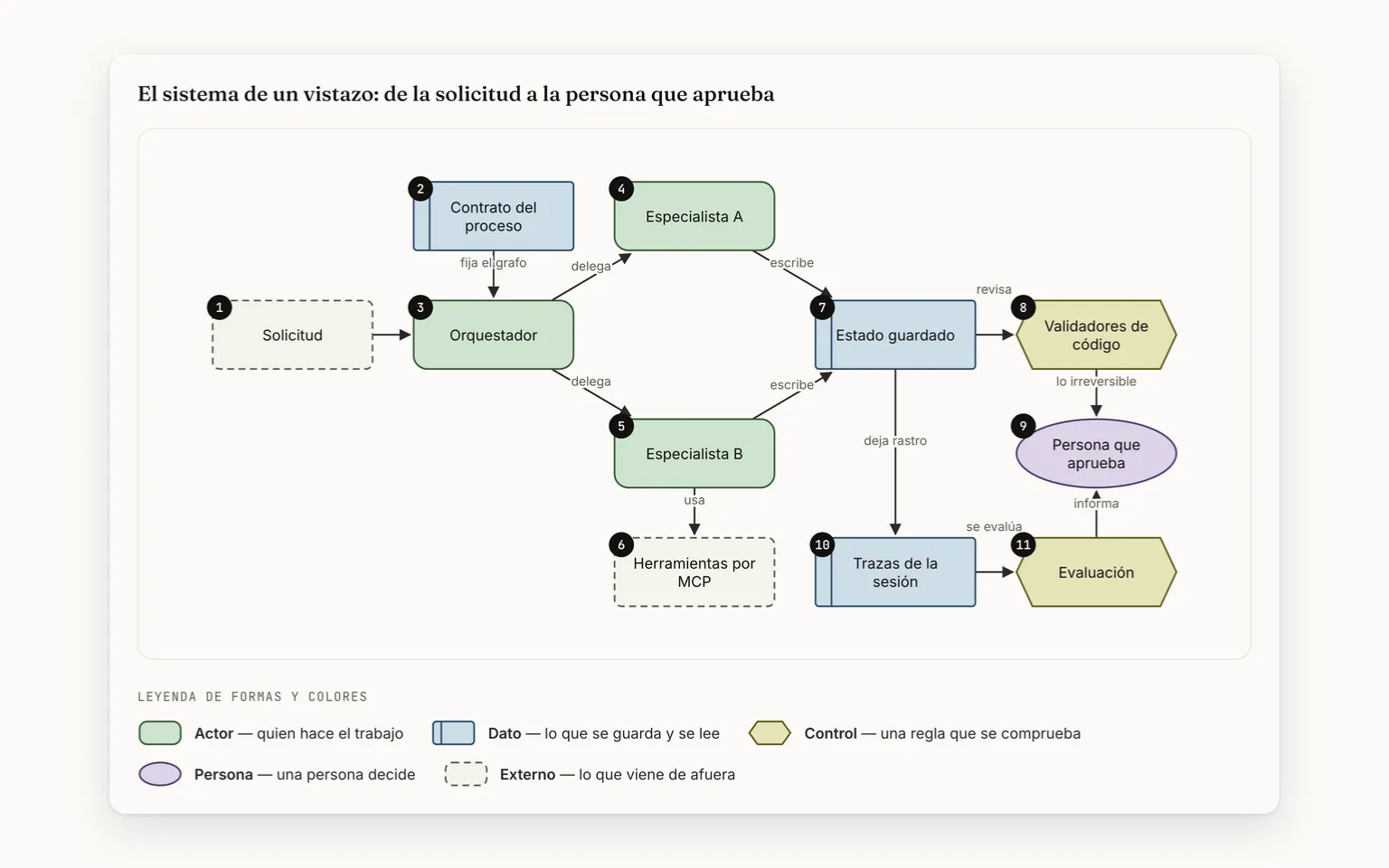
The career: the line, the big year and the first three rolesThe Vesting case: its thesis, its topics and four figuresProbeta DS end to end: each box says who does it, with its notesMethods: the introduction, nine publications and the first two
Product features: One per function in the user manual that a visitor or the owner sees or uses, matched section by section. The chat's don't count here: they go in its own brochure.Case studies: One for each role in the career, in Spanish and English, counted in the CV's data.Methods publications: The “Methods” files. The site's list counts them from the same folder, so no one types that number.Unit and integration tests: The ones that passed in continuous integration on the last change this version includes. Among other things, they check that the data is well formed, that the case figures are in their document and that Spanish and English say the same; some of them run against a real database.End-to-end tests: End-to-end journeys in a real browser: on desktop, on a phone and in Safari. They are counted by listing them; in the last full run 1257 passed and 59 are skipped on purpose.
25 real screens
1From the map to the chapterTap a box on the map to open its chapter; “Back to the map” returns you to that box, and “↩ Back” to where you were.
2Boxes and arrowsEvery chapter has its flow. A box with the screen icon shows it: hover or tap it.
3Cards that flipConcept, difference and decision. Tap a card to see the answer.
4The app tourEvery screen, full screen. Use ← and → on your keyboard.
01
01 · What changes
01 · What changes when a résumé is something you walk through
A typical CVA PDF
With CV Viva9 cases
studies, one per role, with their figures●measured
A static PDF can't show what someone knows how to do. Here each of the nine roles in the career opens its case study with three or four figures, and every figure has to be in its background document. The PDF for applicant tracking systems is still there, from the same source.
A typical CVWith CV Viva
✕A typical CV: A PDF says where someone worked, not what they can do.
→
✓With CV Viva: Each role opens its case: the thesis, its figures, the challenge and how it was done.
✕A typical CV: A bare figure: you can't tell where it comes from.
→
✓With CV Viva: Every achievement with its number and where it comes from; the years of experience are calculated on their own.
✕A typical CV: Percentage bars no one can check.
→
✓With CV Viva: Tools by group, with no percentages: whatever is still being explored says so on its chip.
✕A typical CV: The website and the PDF are edited separately and end up saying different things.
→
✓With CV Viva: The page and the ATS-ready PDF come from the same data on every publish.
✕A typical CV: A project is told with a link and a line.
→
✓With CV Viva: Every app has its brochure and every other piece its sheet: what no one else does, its figures with their source and its limits.
✕A typical CV: How someone thinks doesn't fit on a résumé.
→
✓With CV Viva: “Methods” publishes it: nine pieces on how design is done, with the evidence kept apart from judgment.
Who it is for, and why
Who it is for
For recruiters who have seconds to decide, for technical leads who want to know how someone thinks and not just where they worked, and for whoever comes to see the apps in the Portfolio. A static PDF can't show what someone knows how to do; here every claim leads to its evidence.
What sets it apart
It isn't a template or a PDF with animations. All the content lives in validated data: if a field is malformed, if a case's figure doesn't appear in its background document or if a link leads nowhere, the publish stops before it goes out. The site's counts (apps, products, publications) are measured from the content and none is typed by hand. And the site itself is the proof: the Portfolio publishes every app with its process drawn and every figure with its source, without a single access link.
02
02 · The map
Top to bottom, in the order someone moves through the site: they read the career and open its evidence, explore what gets built and how it is designed, and decide whether to write. On the right, what runs through everything.
1The career and its evidenceThe line scrolls with you and every figure leads to its case
2What gets built and how it is designedThe Portfolio and “Methods”, with every figure and every source in view
3The visitor answers backVotes, proposes, signs up or writes, with no account
02 · The map’s chapters
One chapter per group: what it solves, when it fits, how it works, its screens and its cards.
2.1
2.1 · Your career, to walk throughNine roles on a line that scrolls with you, with their achievements, figures and credentials in view. · 6 features
OpenClose
What it solves
A paper CV is read top to bottom and asks you to take every figure on trust. Here the career is something you walk through: a line scrolls with you showing each role's year, the full achievements open with one click and every credential says whether it is earned or in progress.
It fits if
✓You have seconds and want to see at a glance where he has worked and when.
✓You want a role's achievements with their figures, the same ones the PDF carries.
✓You need to know which certifications are earned and which are in preparation.
What it is not
✕It doesn't rate skills in percentages or proficiency levels.
✕It doesn't force animations on anyone: with “reduce motion” turned on, everything stays still.
How it works · From the timeline to the credentials
StartStepDecisionAt onceEndCV VivaHas a screen
Start · CV Viva: The career section opensThe career section opens
End: Its institution and yearIts institution and year
End: “In progress” instead of a year“In progress” instead of a year
noyesyesno: in progress
Its pieces 6
CV-01A timeline that scrolls with you
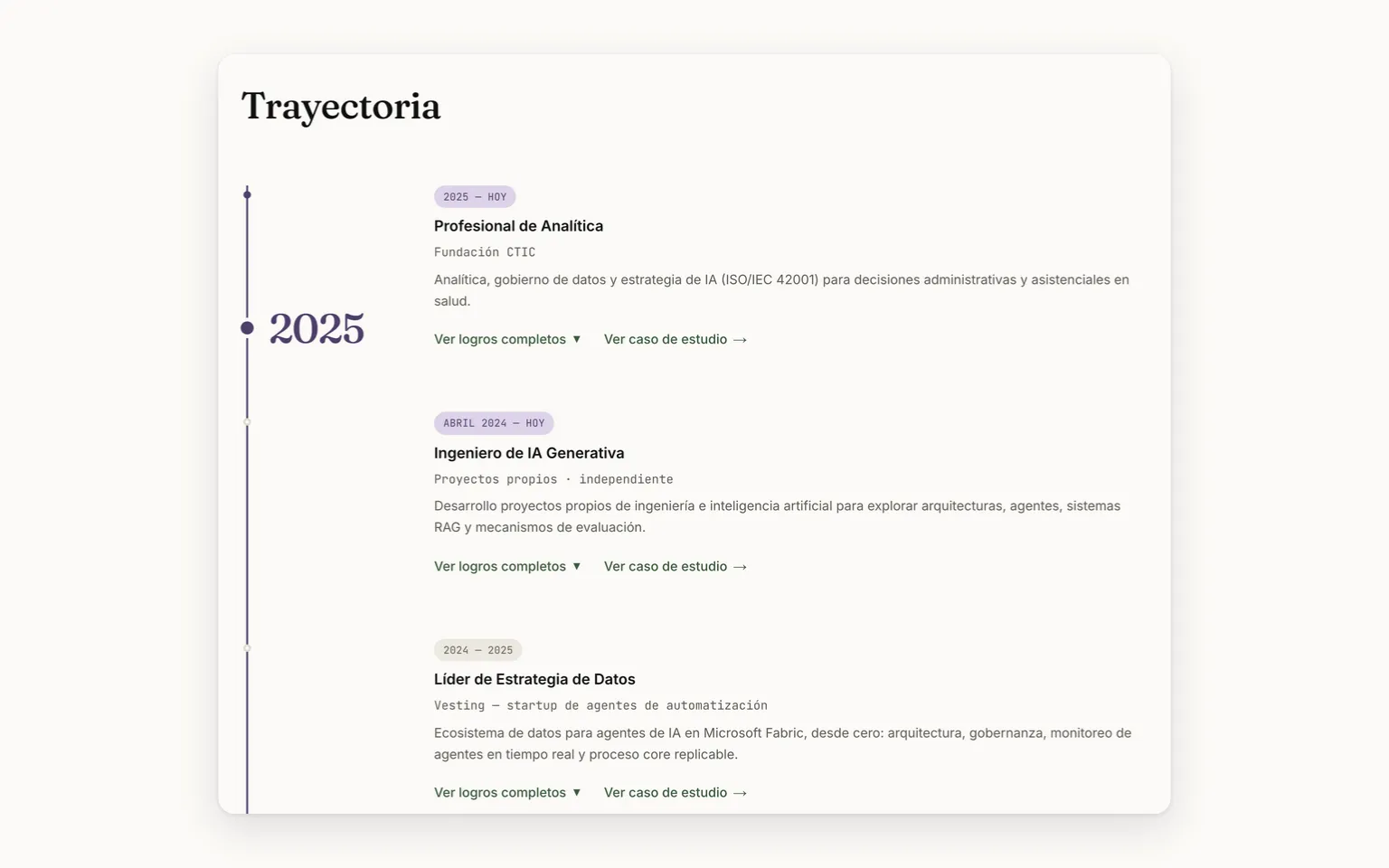
A single line runs through all nine roles. As you scroll, a circle stays at mid-screen and next to it appears the big year of the role you're reading. With “reduce motion” turned on, everything stays still.
The career: the line, the big year and the first three roles
CV-02The full achievements, one click away
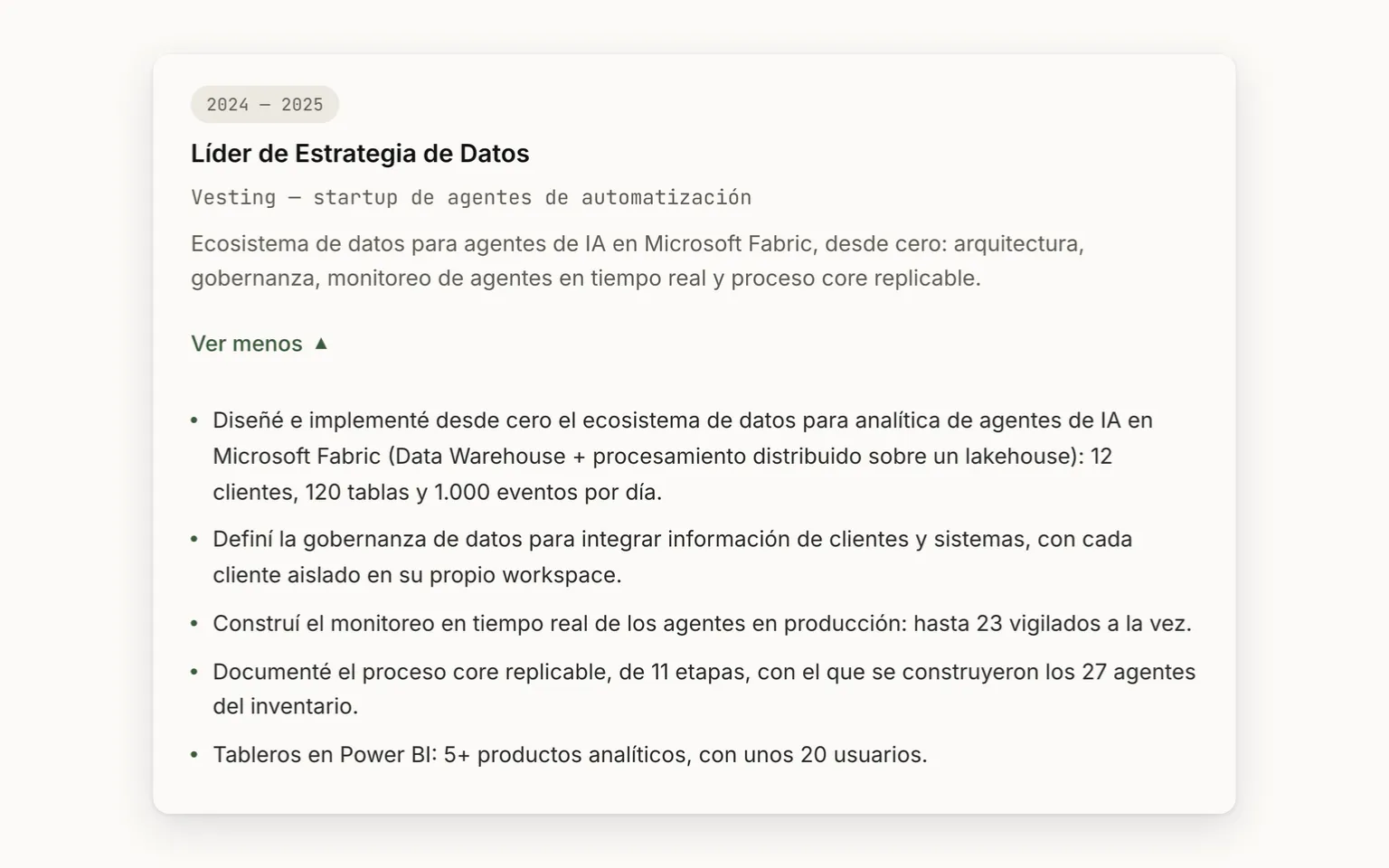
Each role expands its achievements with figures under “See full achievements”, the same ones the PDF carries. A test requires the same number of achievements in Spanish and in English.
Vesting, with its full achievements expanded
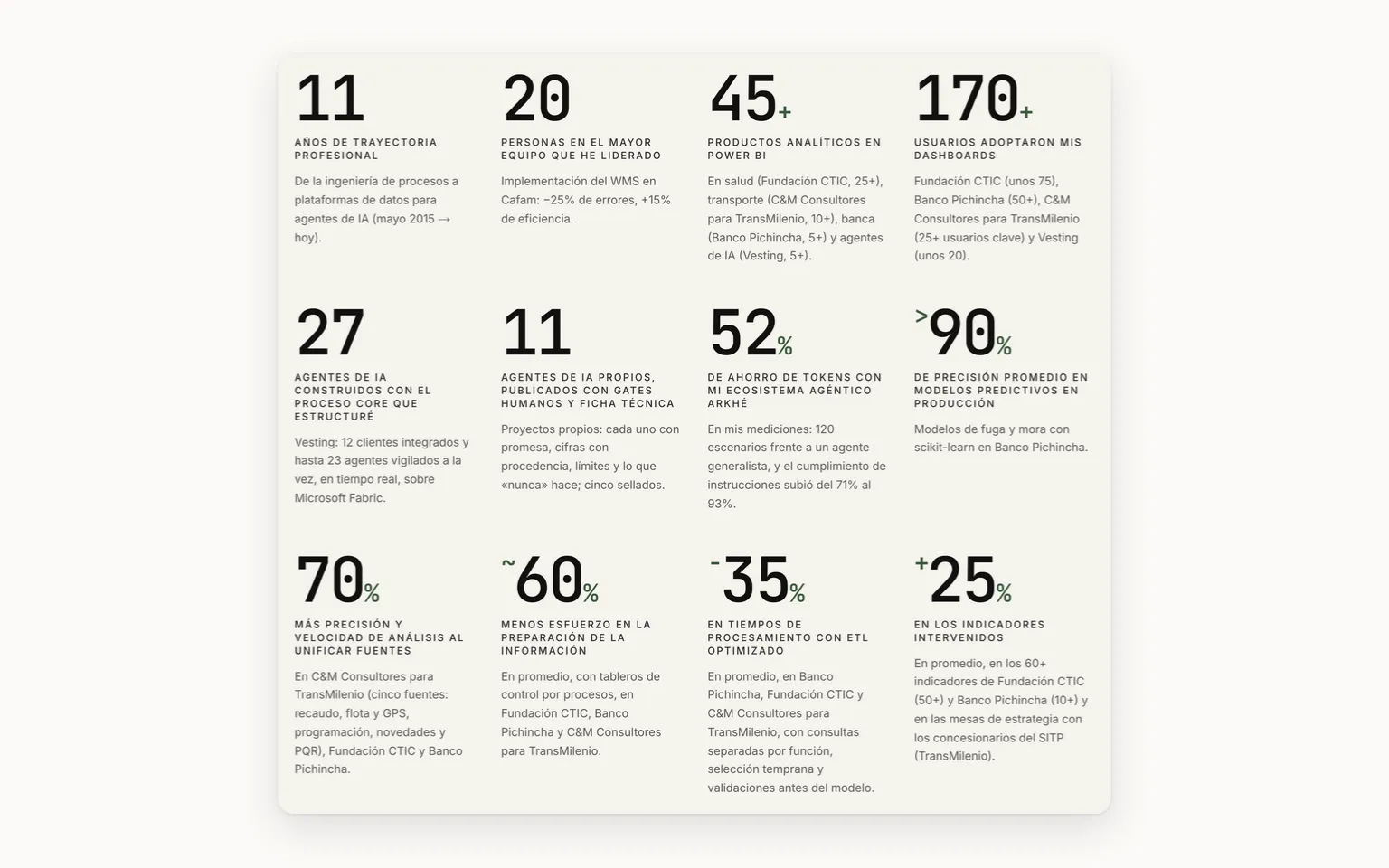
CV-03Twelve achievements with their number
Twelve achievements in three rows of four, each with its big number and where it comes from. Two aren't typed by hand: the years of experience are calculated from the start date, and his own AI agents are counted from their published fact sheets.
The twelve achievements in three rows, each with its number and source
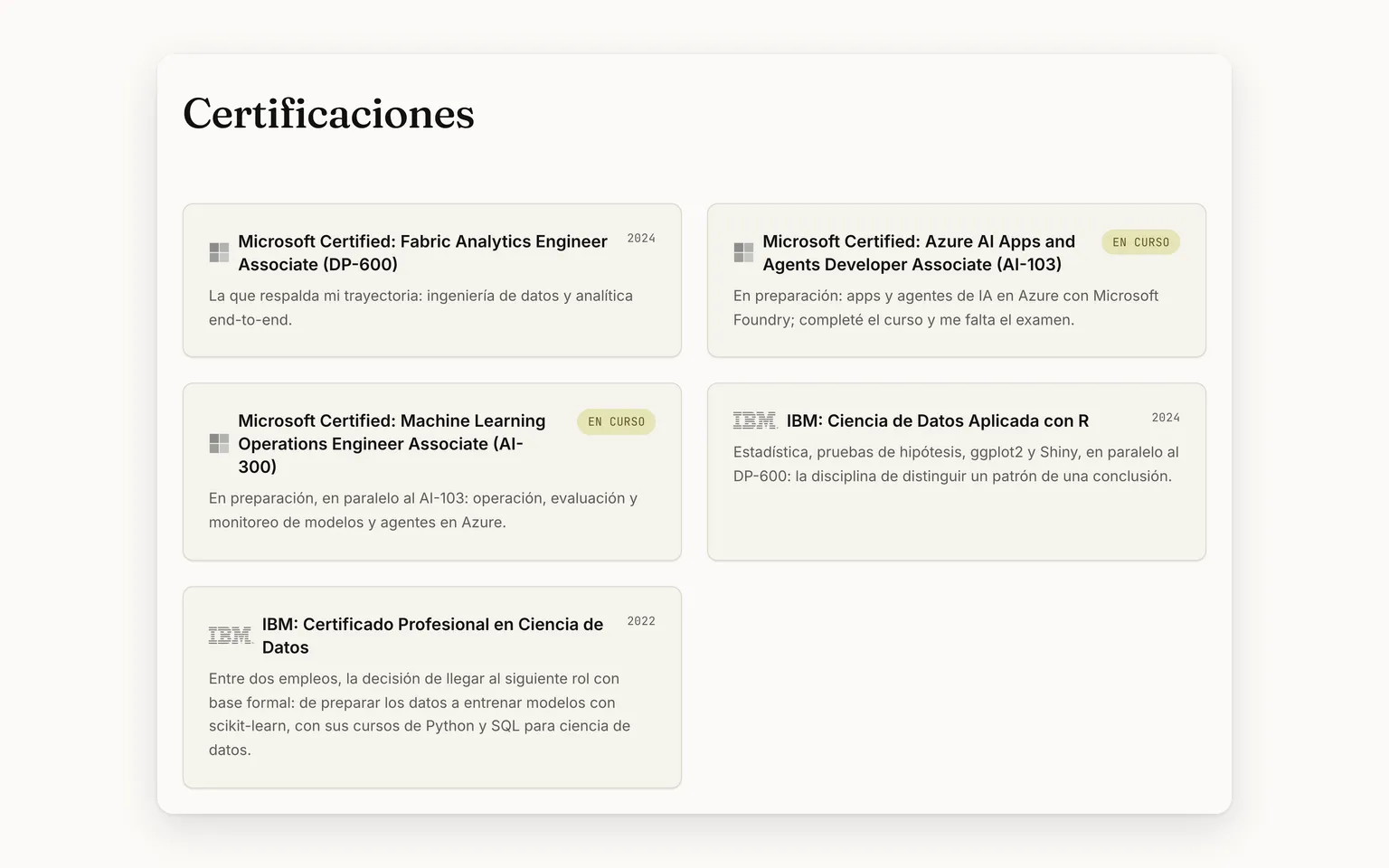
CV-04Certifications with their status
Each certification with its institution and its year, and the ones in preparation with an “In progress” tag instead of a date. Naming a credential in the CV that isn't on the list makes the tests fail.
Five certifications, two marked as in progress instead of a year
CV-05Skills: nine areas to explore
Nine numbered areas float in a dark rectangle: you can grab them, throw them and, when you pick one, its tools gather around it, joined by a line. “See it all as a list” shows the nine cards. No percentages or proficiency levels.
Skills: the explorer's nine areas at rest, with no percentages
CV-06Education with its institution
The three degrees and courses in their own section, with the institution, the period and its logo. The PDF, the printable résumé and the chat read the same information.
The three degrees and courses, with institution and period
Cards 4
Concept
What is the big year in the career section?
Flip ↻
Answer
It is the year of the role level with the circle, which stays at mid-screen as you scroll. It comes from each role's period: its first four digits.
Difference
Earned certification or in progress?
Flip ↻
Answer
Both live on the same certifications list, and naming a credential in the CV that isn't on that list makes the tests fail.
Earned
It carries its institution and the year it was earned.
In progress
It carries an “In progress” tag instead of a date.
Decision
Another year of experience goes by: who updates the figure?
Flip ↻
Answer
No one. The years of experience aren't typed by hand: they are calculated on every publish from the start date, so the figure goes up on its own.
Decision
A role has an achievement in Spanish that is missing in English: what happens?
Flip ↻
Answer
The publish doesn't go out. A test requires the same number of achievements in both languages, and the PDF carries the same ones as the page.
2.2
2.2 · The evidence, one click awayA case study per role and a PDF that recruiting systems read, both from the same source. · 2 features
OpenClose
What it solves
A résumé makes claims and rarely shows them. Here each role opens its case study with its figures, and every figure has to be in its background document. For the recruiting system, the same content comes out as a text PDF.
It fits if
✓You want to see how a job was done: the context, the challenge, the chapters and what it left behind.
✓Your process goes through an applicant tracking system (ATS) and you need a PDF it can read.
✓You want to know where a figure comes from before you believe it.
What it is not
✕The PDF is not a design piece: it is plain on purpose, so ATS can read it.
✕A case doesn't publish a figure its background document doesn't state.
How it works · From a new figure to the recruiter's PDF
StartStepDecisionAt onceEndOwnerCV VivaHas a screen
Start · Owner: Has a new figure for a caseHas a new figure for a case
Step · Owner: Writes it in Spanish and EnglishOwnerWrites it in Spanish and English
Step · CV Viva: Checks the background documentCV VivaChecks the background document
Decision · CV Viva: Does the document state it?CV VivaDoes the document state it?
Step · CV Viva: Stops and names the figureCV VivaStops and names the figure
Step · CV Viva: Publishes the case and figuresCV VivaPublishes the case and figures
Step · CV Viva: Builds the PDF from that sourceCV VivaBuilds the PDF from that source
End: Text PDF, ready for ATSText PDF, ready for ATS
yesnogets fixed
Its pieces 2
CV-07A case study for each role
Each role has its page: the thesis, three or four figures, the context, the challenge, “How I did it” in chapters and what he took away from it. A figure its background document doesn't state stops the publish.
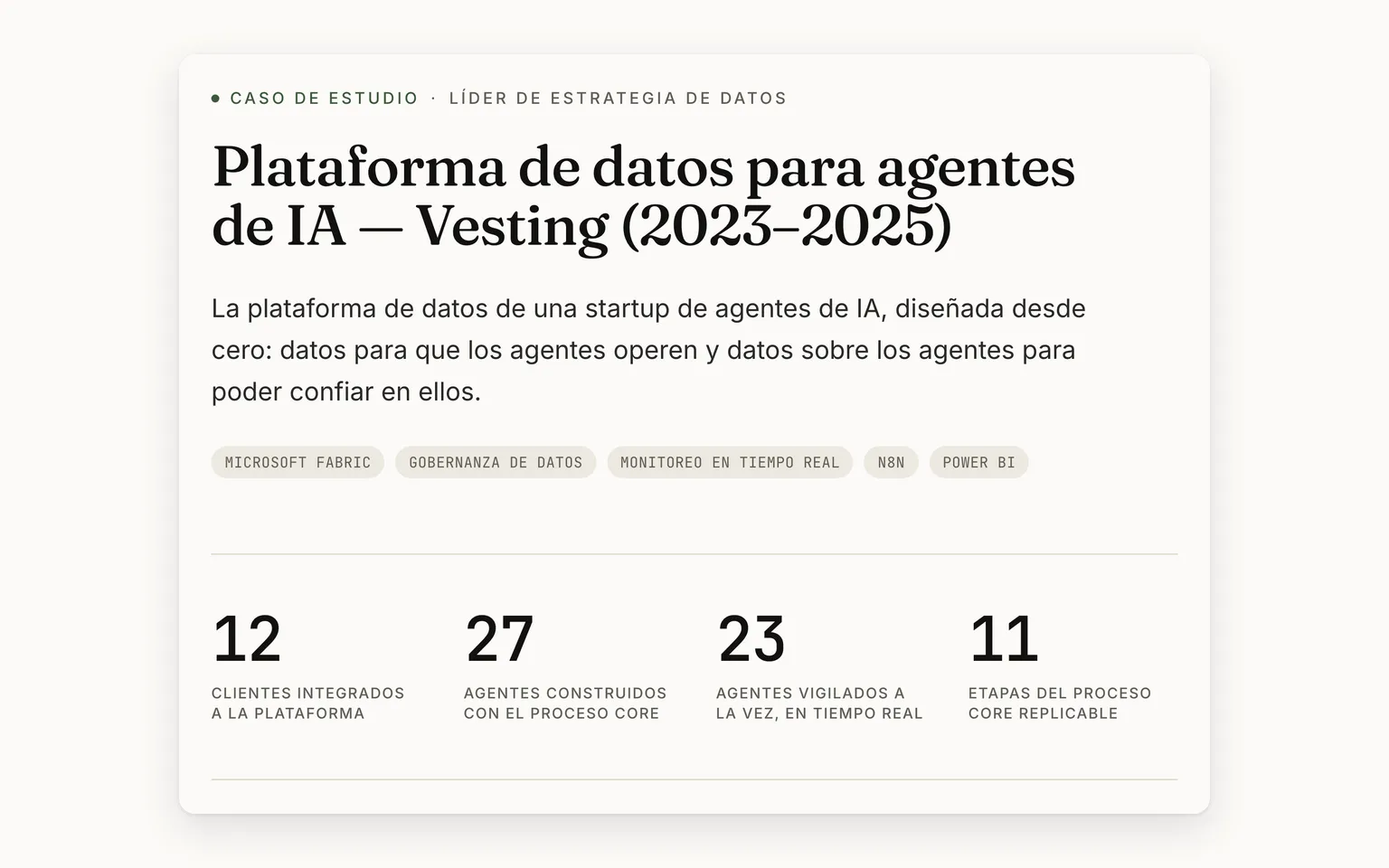
The Vesting case: its thesis, its topics and four figures
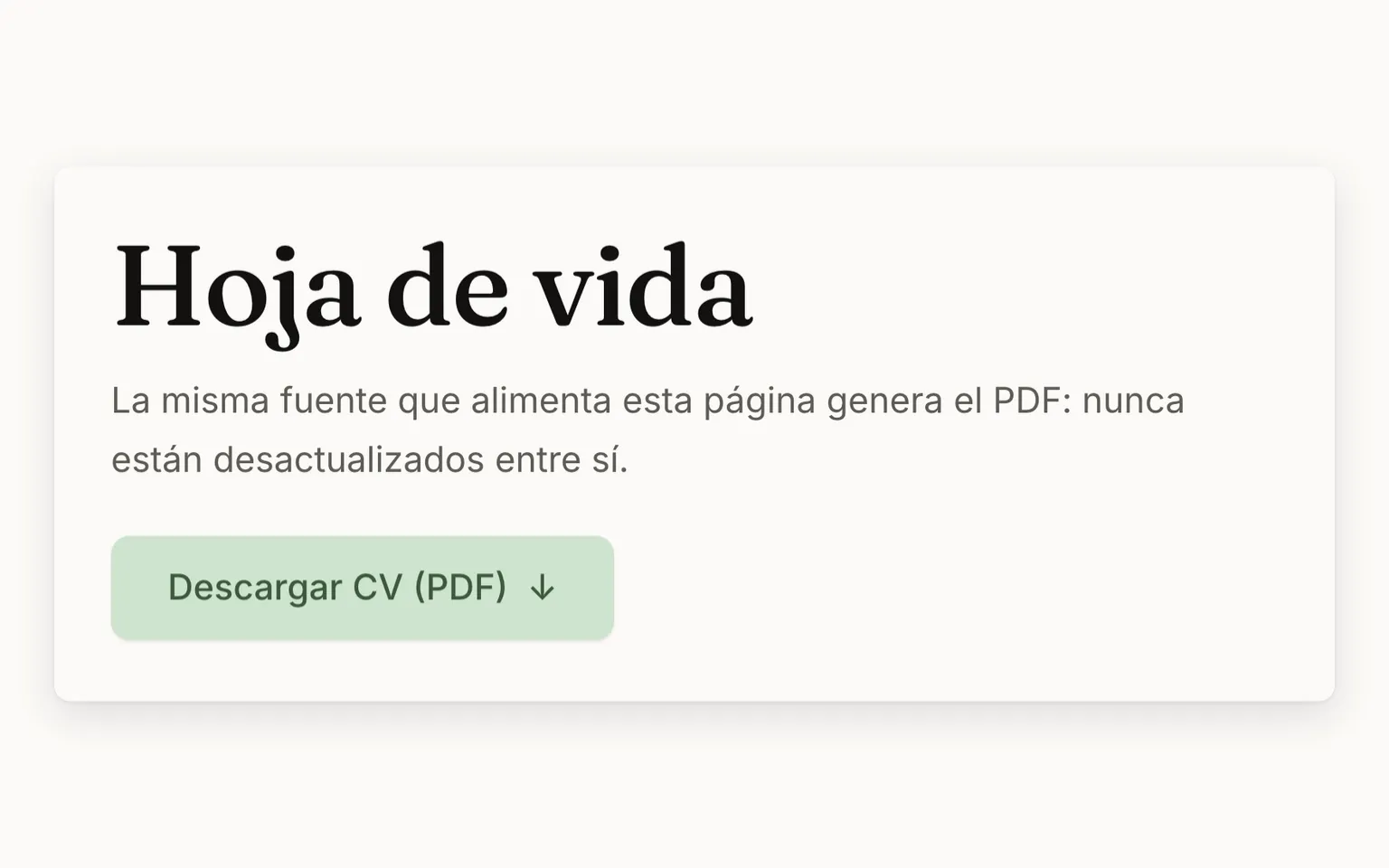
CV-08The CV as an ATS-readable PDF
The “CV (PDF)” button delivers a PDF with selectable text, in two columns and in the order an applicant tracking system reads it. It is generated on every publish from the same source as the page, in Spanish and in English.
The printable résumé and its PDF button, from the same source
Cards 4
Concept
What does a case study contain?
Flip ↻
Answer
The thesis in one sentence, a band of three or four figures, the context and the challenge, “How I did it” in chapters, the impact and “What I take with me”. There is one for each role in the career, in Spanish and English.
Concept
What is a case's background document?
Flip ↻
Answer
It is the long, approved text the case page draws from. Every figure in the band has to appear in it, as a number or in words.
Difference
The page or the PDF?
Flip ↻
Answer
Both come from the same data on every publish, so they never say different things: the form changes, not the content.
The page
The case study with its thesis, figures and chapters, to read at leisure.
The PDF
Selectable text in two columns, in the order an ATS reads it.
Decision
A case gets a figure its background document doesn't state: what happens?
Flip ↻
Answer
The publish stops and names the figure. The live version stays as it was until the figure is fixed or the document backs it.
2.3
2.3 · The Portfolio, with a brochure per app★ The starOne brochure per app and one sheet per piece: the process drawn, the figures with their source and no access link. · 7 features
OpenClose
What it solves
Telling a project with a link leaves the reader hunting for the evidence. Here every app has its brochure and every agent, dashboard or research piece its technical sheet: what no one else does, its figures with their source, its process drawn and its limits, without a single access link.
It fits if
✓You want to see what someone builds, not just what they say they know.
✓You want to understand what an app does and what it doesn't, with its screens and its figures.
✓You want to see inside a private app, without installing anything.
What it is not
✕It doesn't hand the apps over: there are no access or code links.
✕It doesn't show the real-time state: each product is shown at its pinned version, with its date.
How it works · From the four-front portal to an app's brochure
StartStepDecisionAt onceEndCV VivaHas a screen
Start · CV Viva: The Portfolio opensThe Portfolio opens
Step · CV Viva: Shows the fronts and their countsCV VivaShows the fronts and their counts
Decision · CV Viva: Is the product an app?CV VivaIs the product an app?
Step · CV Viva: Carousels: professional firstCV VivaCarousels: professional first
Step · CV Viva: Opens its brochure and figuresCV VivaOpens its brochure and figures
Step · CV Viva: Draws its process end to endCV VivaDraws its process end to end
End: Waiting list, no access linkWaiting list, no access link
Step · CV Viva: Adds “What the data says”CV VivaAdds “What the data says”
End: Shown, with no waiting listShown, with no waiting list
yesno: agent or dashboard
Its pieces 7
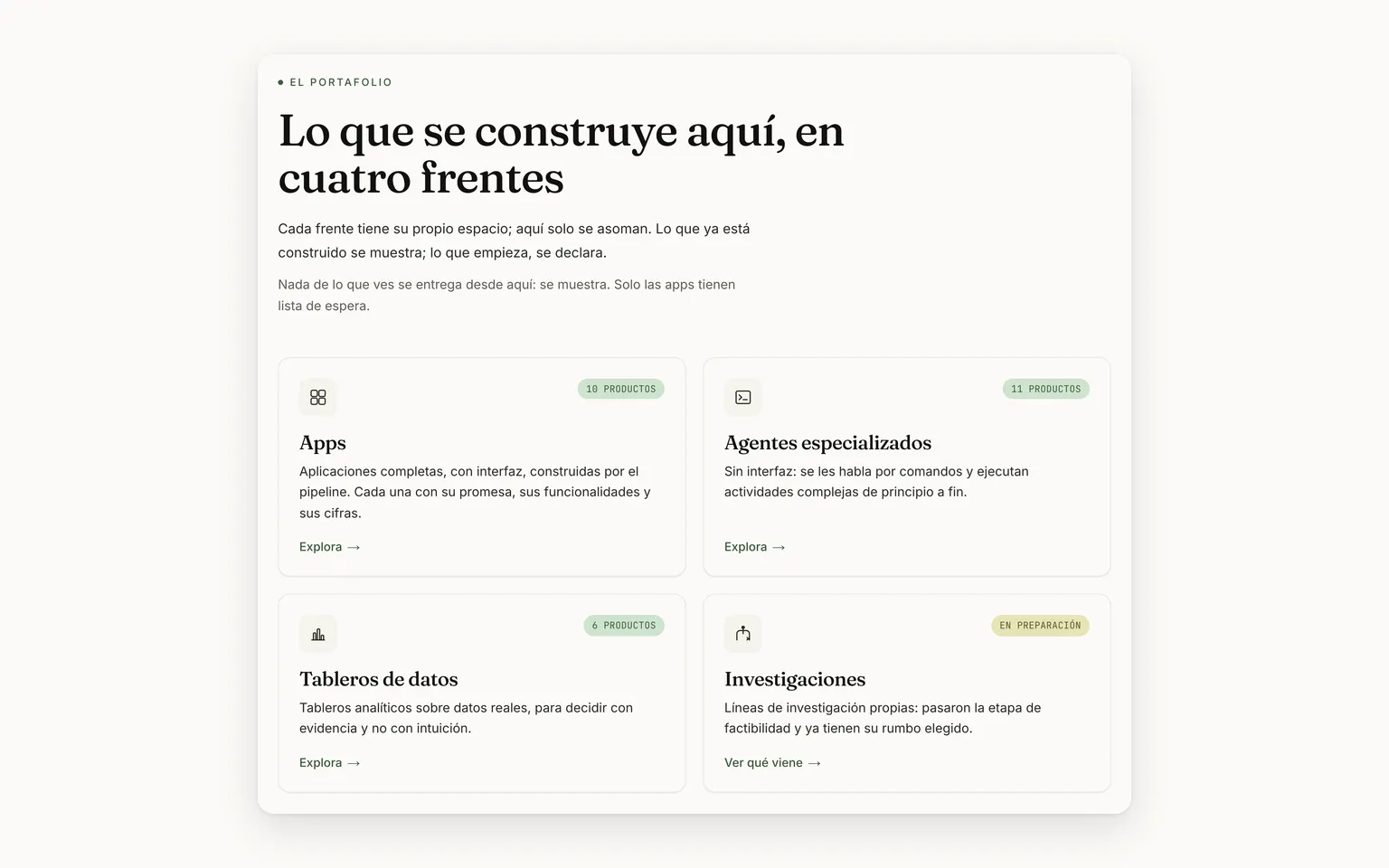
CV-09Four fronts, each with its own space
Apps, agents, dashboards and research: each front with its box, its status and how many products it has. That count isn't typed: it is measured from the published content.
The Portfolio: four fronts, each with its status and count
CV-10Professional and personal, in a carousel
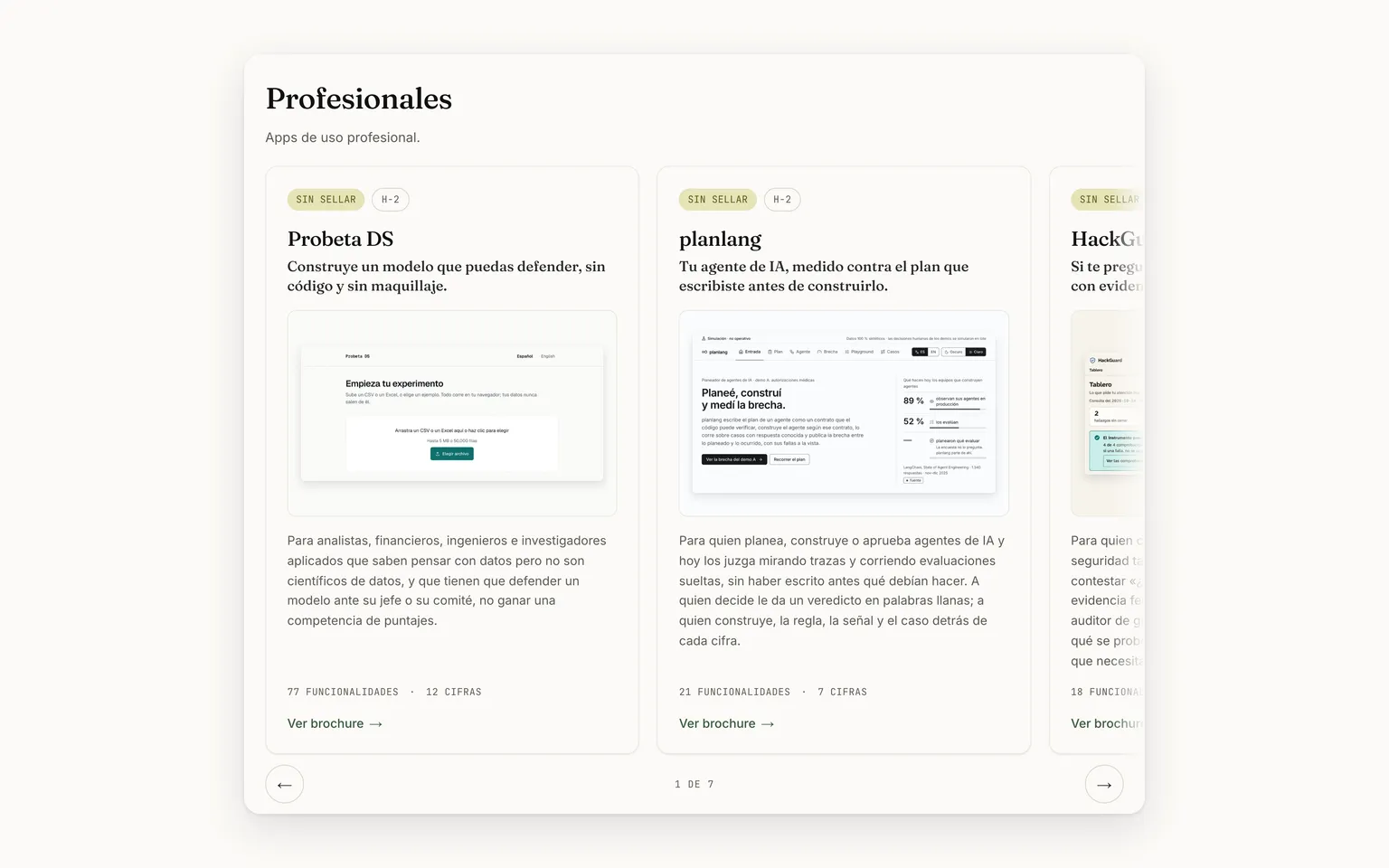
The apps come in two blocks, professional first, each in a carousel that shows where it starts and where it ends. You move through it with the arrows, a finger, the keyboard or the trackpad's sideways swipe.
Professional apps in a carousel: two in full and the third peeking in
CV-11Each app's page is its brochure
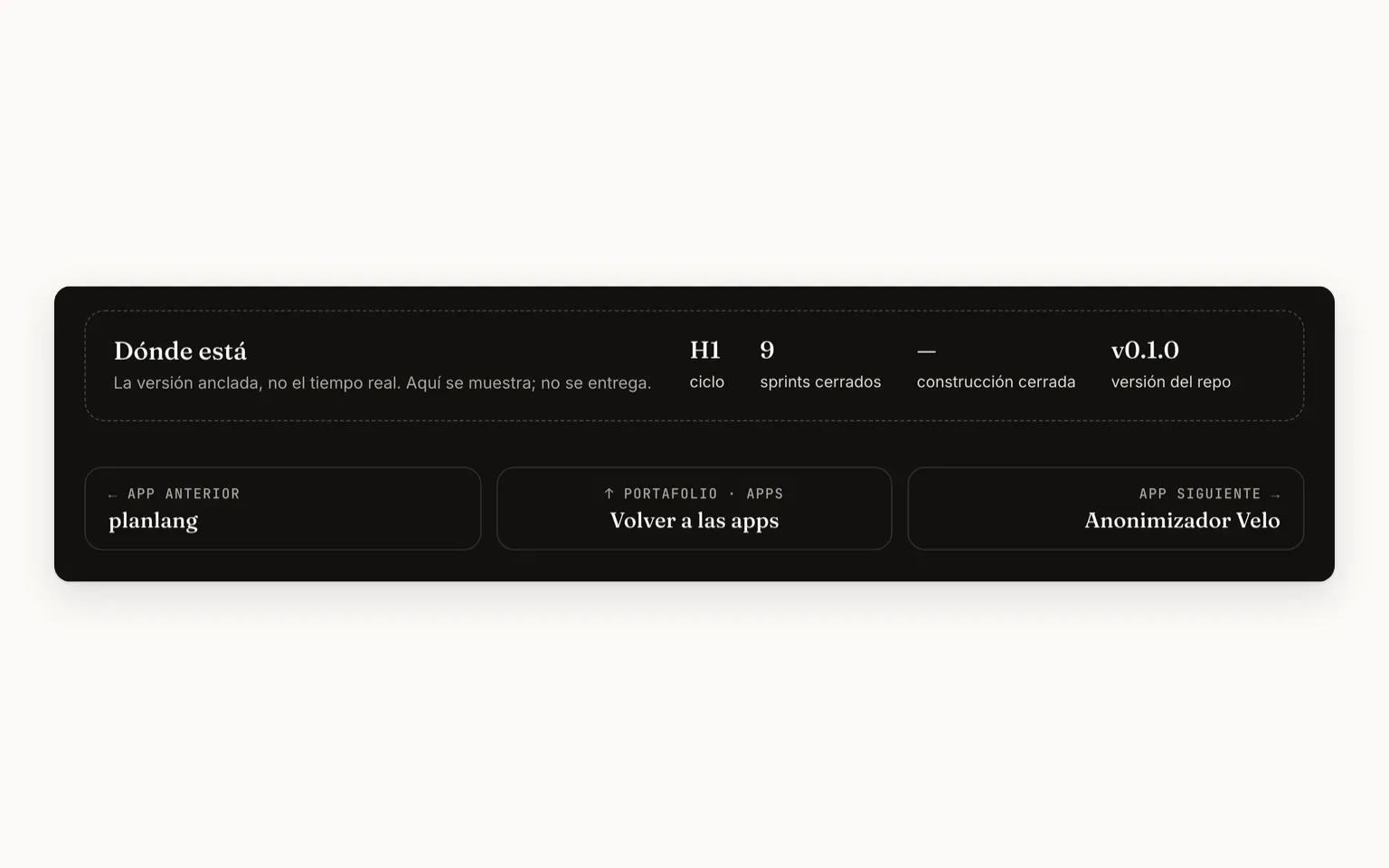
All ten apps open on their brochure, at a single address per app: the app's card in the Portfolio says “View brochure” and old links arrive in a single hop. At the foot, “Where it stands” gives the pinned version, and the neighbors lead to the previous or the next app without going back to the apps list.
At the foot of HackGuard's brochure: where it stands and its two neighbors
CV-12The process, drawn from the data
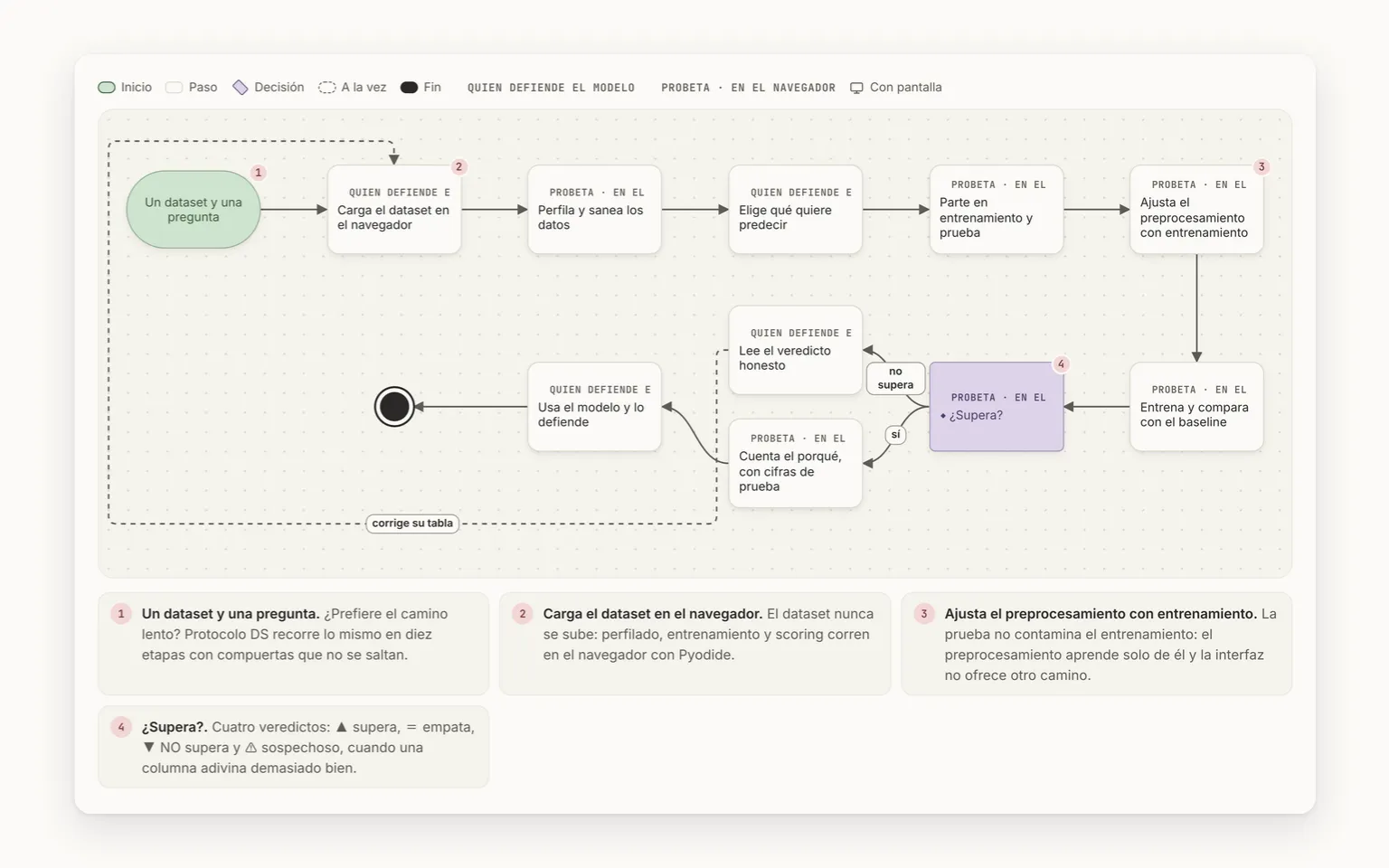
In each app's brochure, “End to end” draws the whole process: each box says who does it, the decision is marked where it is made and the loops stay in plain sight. The sheets of agents, dashboards and research pieces that have a process draw it in BPMN, one lane per actor. Both come from the data, and a malformed process stops the publish.
Probeta DS end to end: each box says who does it, with its notes
CV-13A brochure per app, with its screens
Each app has its brochure: the promise with its figures and screens, a chapter per feature group, the end-to-end process, the figures with their source and, at the close, “Use it”. It has contents, a search box, an app tour of the screens, and it prints.
HackGuard's brochure: the promise, its screen and the five sections
CV-14Agents, dashboards and research, with their sheet
The pieces that aren't apps have their two-minute technical sheet: the headline of what no one else does, its figures with their source, its limits and what it never does. Those that bring data add “What the data says”: each finding with its figure and its source.
Energy and climate: six findings, each with its figure and source
CV-15The simulation, from the brochure
A private app can show its static simulation: “See the simulation →”, in “Use it”, opens its page, where it plays in a frame or full screen and doesn't load until someone asks for it.
planlang's simulation, opened in a frame inside its page
Cards 4
Concept
What is an app's brochure?
Flip ↻
Answer
Each app's page: it opens with the promise, its figures and its screens, walks through its features chapter by chapter and closes with “Use it”. Agents, dashboards and research pieces have a two-minute technical sheet instead.
Concept
What do “measured” and “declared” mean next to a figure?
Flip ↻
Answer
It is its source. Measured comes from a counter or a command; calculated, from a measurement with a rate or a rule; declared was set by a person; estimate is inferred. A figure with no source doesn't get in.
Difference
An app or an agent?
Flip ↻
Answer
An app is shown in its brochure; an agent, a dashboard or a research piece, in its technical sheet. What changes is how much each product brings and whether it can be requested.
An app
Its brochure draws the process end to end and closes with “Use it”: the waiting list, with no promised date, and the roadmap to vote on.
An agent or a dashboard
Its two-minute technical sheet; with data, it adds “What the data says”. It is shown, not handed over.
Decision
An app arrives with a process that has no end, or a decision with a single path: what happens?
Flip ↻
Answer
The publish fails and the error says what and where. The diagram comes from the data, so a malformed process never gets drawn.
2.4
2.4 · Visitors get a say tooVote on what's next, propose an idea, join the waiting list or write, without creating an account. · 4 features
OpenClose
What it solves
Visitors don't just read: they vote on what's next for each app with one click, propose an idea, join the waiting list or write. None of it requires an account, and the messages travel to the owner's inbox without being stored in any database.
It fits if
✓You want an app to build the feature you care about first.
✓An app interests you and you want to hear when it opens, with no promised date.
✓You want to propose a project, an advisory, a training, a talk or a role.
What it is not
✕It is not a sign-up: voting asks for no account, and the vote stores neither your IP nor your identity.
✕It is not a forum: proposals reach the owner's inbox and are not published.
Step · CV Viva: Emails new ideas to the ownerCV VivaEmails new ideas to the owner
End: Nothing published or storedNothing published or stored
noyesnoyes
Its pieces 4
CV-16A roadmap you vote on, no sign-up
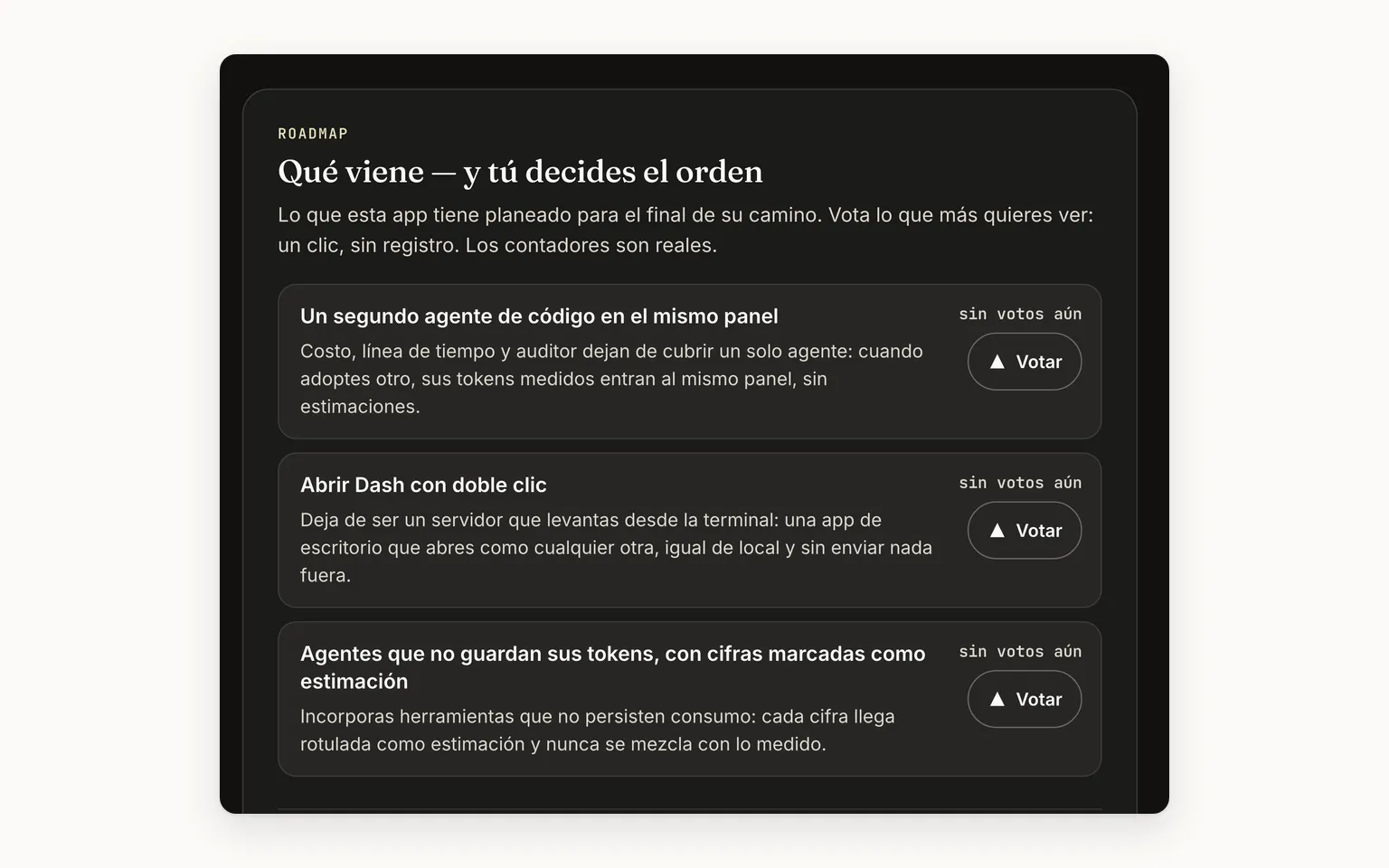
In “Use it”, each app shows what it has planned and lets you vote with one click, no sign-up; five ideas are shown and “See all N ideas” shows the rest. The count comes from the database at that moment; if the database doesn't respond, the section says so and turns off the buttons.
Dash Agent's roadmap in “Use it”: three ideas to vote on, no votes yet
CV-17Propose a feature
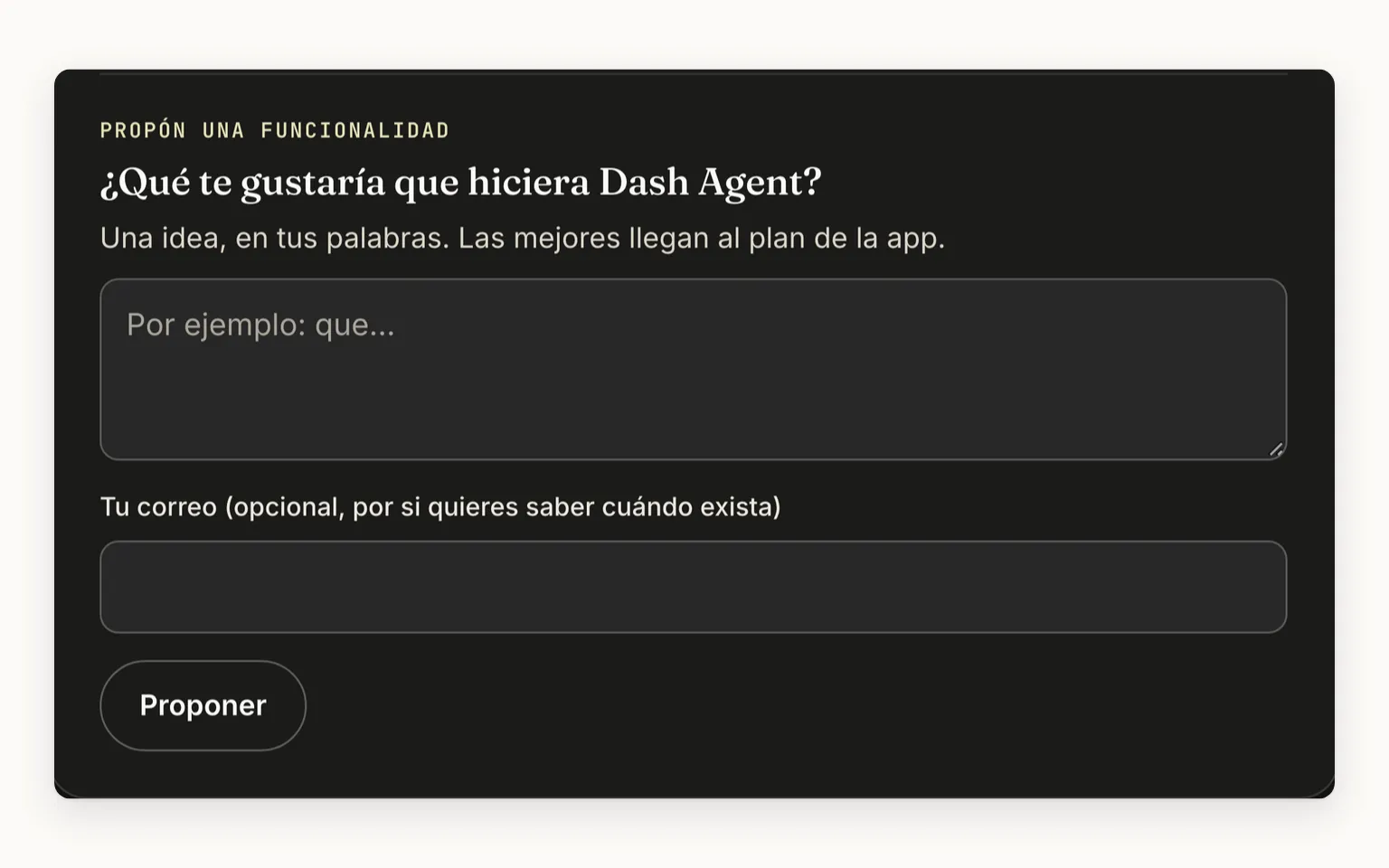
Below the roadmap, a box takes ideas in the visitor's own words, with an optional email. The proposal reaches the owner's inbox and is neither published nor stored in the database.
The box to propose a feature for Dash Agent
CV-18The apps' waiting list
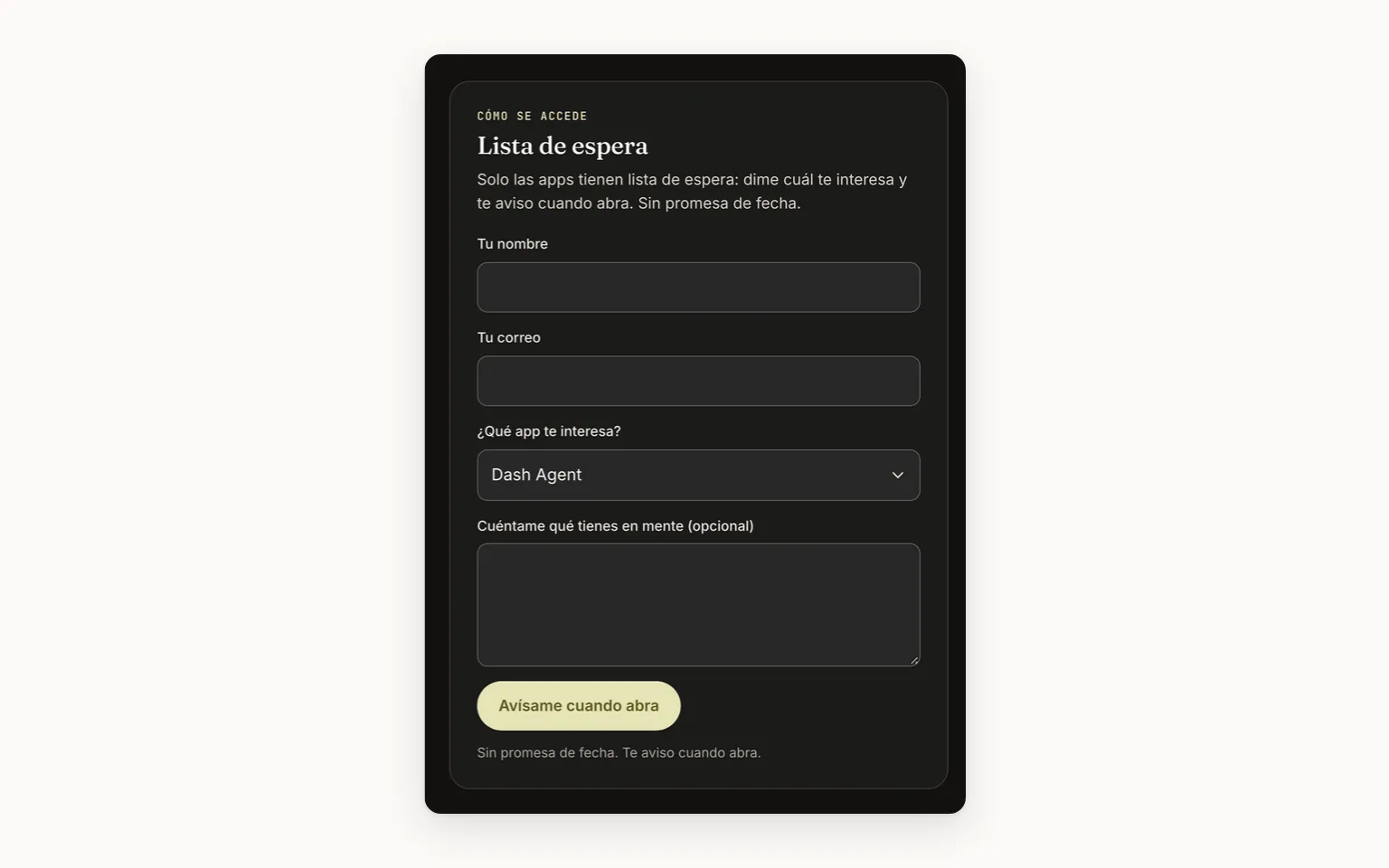
In “Use it”, the close of each app's brochure, a form signs up whoever wants in, with the app already chosen and no promised date; it is also at the foot of the apps list. Only the apps have one: agents, research and dashboards are shown, not handed over.
The waitlist in “Use it”, with the app already chosen and no promised date
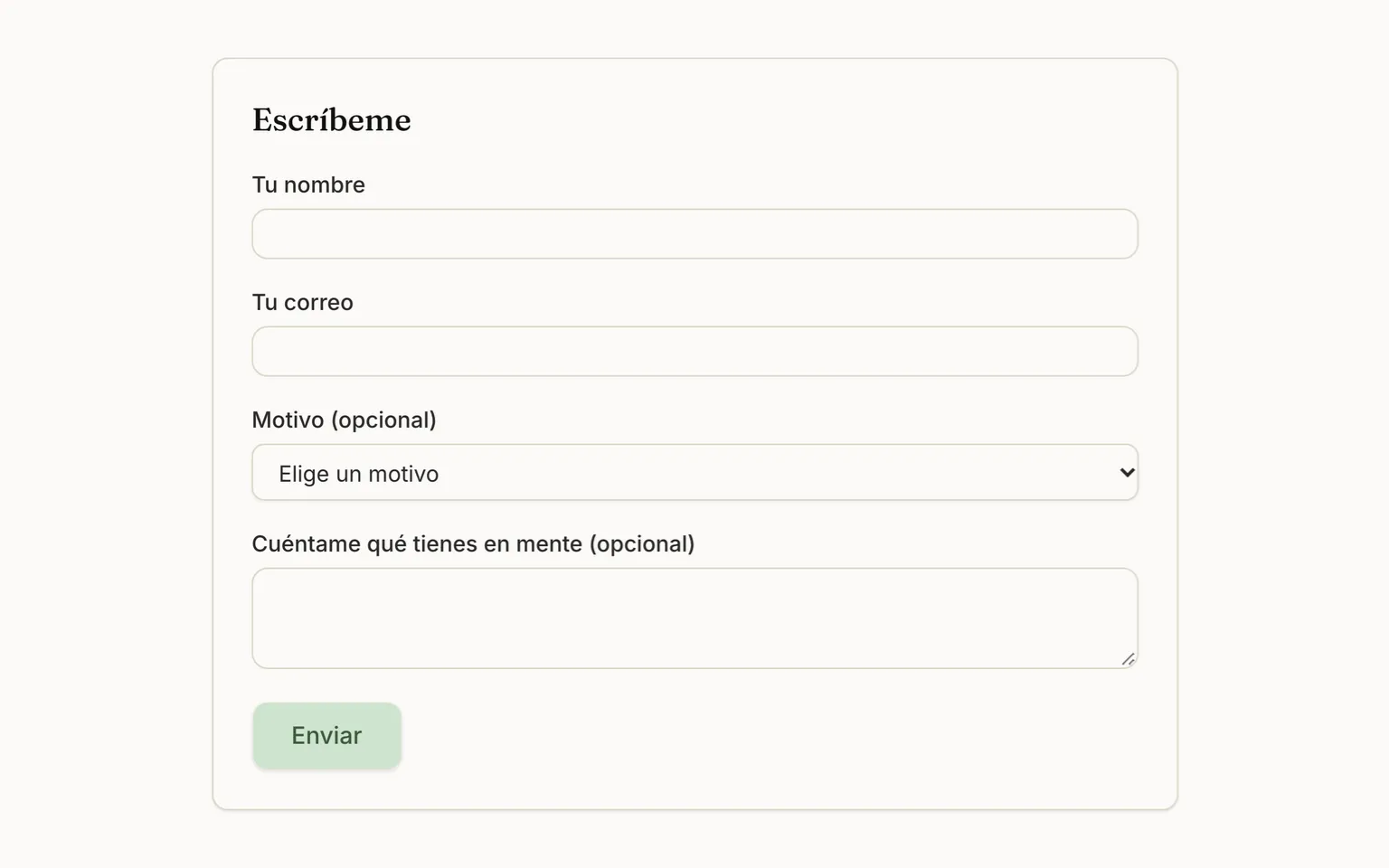
CV-19“Write to me”, with a reason
The contact form asks for a name, an email, an optional reason (a project, an advisory, a training, a talk or a role) and the message, and delivers it to the owner's inbox. It has a per-visitor limit and a trap for bots.
The contact form: name, email, reason and message
Cards 4
Concept
What does a vote store?
Flip ↻
Answer
Only the app, the feature and the date: neither the IP nor the identity of whoever votes. The “you already voted” notice lives in the visitor's browser.
Difference
Waiting list or “Write to me”?
Flip ↻
Answer
Both reach the owner's inbox and neither is stored in a database. Agents, research and dashboards have no waiting list: they are shown, not handed over.
Waiting list
Only on apps, in “Use it”, the close of their brochure, with the app already chosen and no promised date.
“Write to me”
The general form: name, email, an optional reason and the message.
Decision
Someone clears their browser data and votes again: does it count?
Flip ↻
Answer
Yes: voting counts one vote per browser. It is the price of asking for no sign-up and storing no personal data, and it is stated as a limit.
Decision
Someone sends “Write to me” and the email service isn't configured: what happens?
Flip ↻
Answer
The sender sees the confirmation, but the message doesn't arrive. Since the form stores nothing, no copy is left: it is one of the stated limits.
2.5
2.5 · Methods: how design is done, publishedNine publications in an impersonal voice, with ten fixed blocks, three separate voices and dated sources. · 3 features
OpenClose
What it solves
A CV says where someone worked, not how they design. “Methods” publishes it: nine long pieces on how AI, data and BI systems are designed, with the same ten blocks, the evidence kept apart from judgment and dated sources.
It fits if
✓You are a technical lead and want to know how someone thinks, not just where they worked.
✓You are after a specific topic, such as structuring an agent system, and want to jump straight to the block you need.
✓You need to tell what was done in a project apart from what the field does and from the author's opinion.
What it is not
✕It is not a first-person blog: the pieces are written in an impersonal voice.
✕The author's judgment is not presented as fact: it is labeled as a position.
How it works · Every claim, with the evidence its voice requires
StartStepDecisionAt onceEndOwnerCV VivaHas a screen
Start · Owner: Writes a claim in a pieceWrites a claim in a piece
Decision · Owner: Which voice is it?OwnerWhich voice is it?
Step · CV Viva: Evidence: needs its documentCV VivaEvidence: needs its document
Step · CV Viva: Field: needs a dated sourceCV VivaField: needs a dated source
Step · CV Viva: Judgment: labeled, no sourceCV VivaJudgment: labeled, no source
Decision · CV Viva: Has what its voice needs?CV VivaHas what its voice needs?
Step · CV Viva: Stops and names file and fieldCV VivaStops and names file and field
Step · CV Viva: Publishes with voices labeledCV VivaPublishes with voices labeled
End: The map, with its readingThe map, with its reading
● evidence◆ field▲ judgmentyesnogets fixed
Its pieces 3
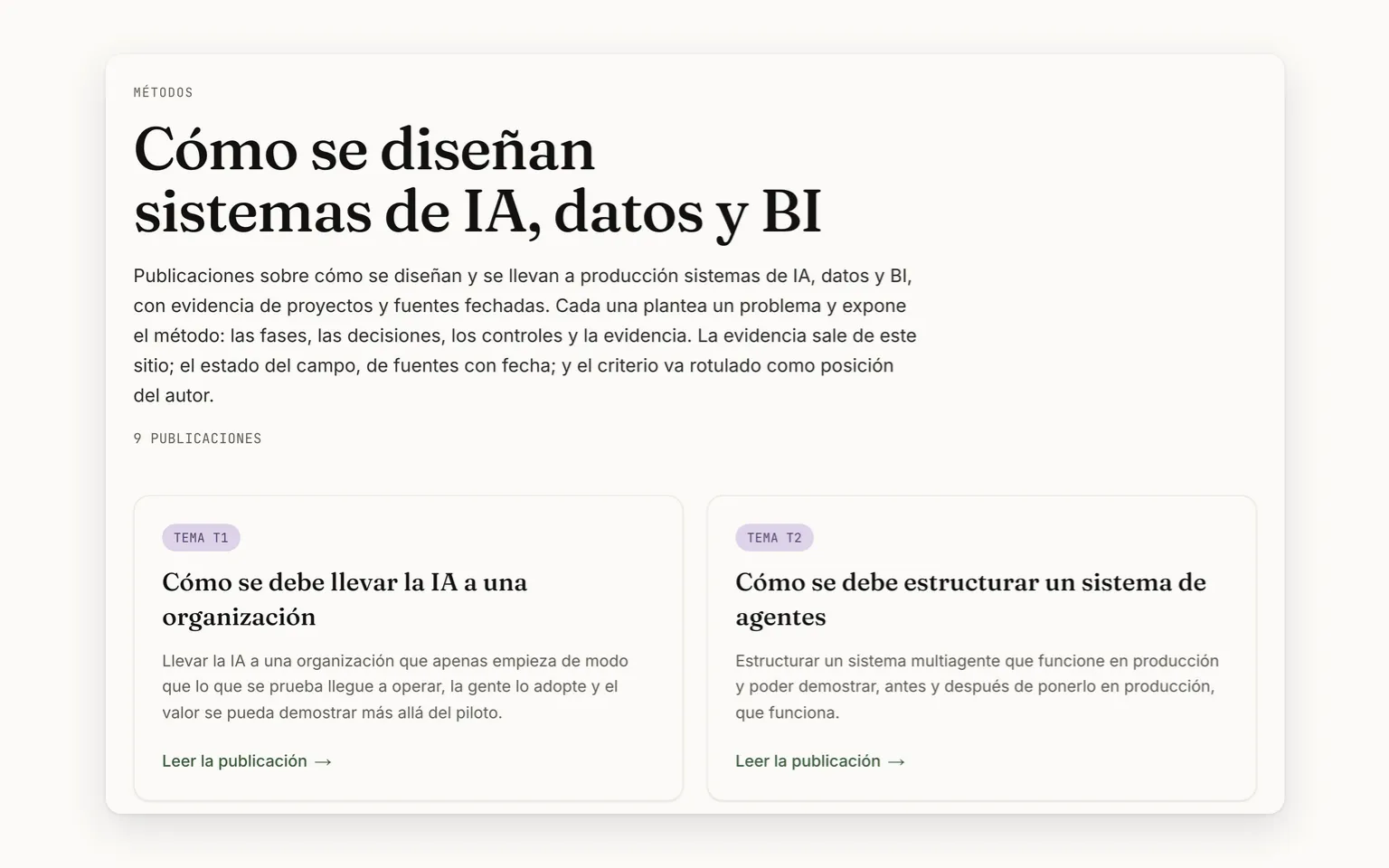
CV-20Nine method publications
“Methods” gathers nine long publications, each on a “How … should be …” question about AI, data or BI. The list counts its pieces from the files: no total is typed by hand.
Methods: the introduction, nine publications and the first two
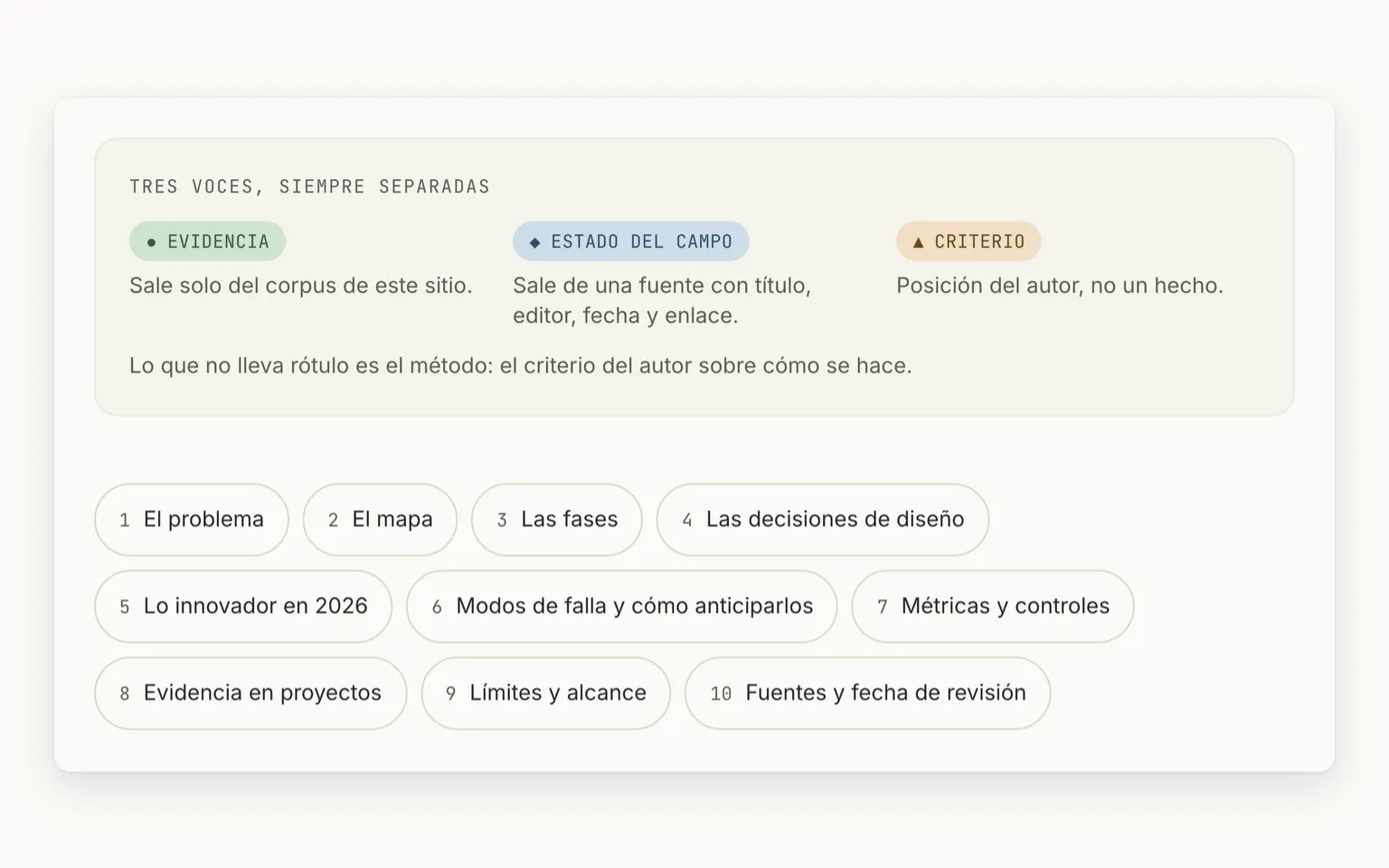
CV-21Ten blocks and three voices
Every publication has the same ten blocks, with an index and an anchor per block. The evidence from projects, the state of the field and the author's judgment are labeled with a symbol, a word and a color, never with color alone.
The three labeled voices and the index of the ten blocks
CV-22A map drawn from the data
Every publication has its map: a diagram with real text, which can be selected and translated, and below it a node-by-node reading, for screen readers and for print.
The map of an agent system, with its shape legend
Cards 4
Concept
What are the three voices?
Flip ↻
Answer
Evidence (●): what was done in a named project, drawn only from the site's corpus. State of the field (◆): what the field does, from a source with title, publisher, date and link. Judgment (▲): the author's position, labeled as such. Each carries a symbol, a word and a color, never color alone.
Concept
What are the ten blocks?
Flip ↻
Answer
The problem, the map, the phases, the design decisions, what is new in 2026, the failure modes, the metrics and controls, the evidence from projects, the limits and scope, and the sources with their review date. Always in that order, each with its anchor.
Difference
The map or its reading?
Flip ↻
Answer
Both say the same: the diagram to see it, the reading for whoever can't see it or prints it.
The map
A diagram drawn from the data, with real text you can select and translate.
The reading
The same map in words, node by node, for screen readers and for print.
Decision
A state-of-the-field claim arrives without a source: what happens?
Flip ↻
Answer
The publish stops and names the file and the field. Each voice carries only its own evidence: the field, its dated source; the evidence, its document; the judgment, none.
2.6
2.6 · A well-kept houseTwo languages, a short menu, a maintenance notice, a 404 that makes sense and motion you can turn off. · 6 features
OpenClose
What it solves
The details that make a site trustworthy are looked after too: everything exists in Spanish and English, the menu fits in four destinations, an address that doesn't exist returns a 404 that makes sense, motion can be turned off and a mistyped field stops the publish without breaking what is already live.
It fits if
✓You read in English and want to switch language without losing your place.
✓You prefer reduced motion and want the content to stay still.
✓You arrive through an old or mistyped address and want a way out, not a server error.
What it is not
✕It has no dark mode yet: it is light theme only, recorded as a debt.
✕It doesn't guess your language: the root always opens in Spanish, and the ES/EN button changes it.
How it works · A request to the site, with no dead ends
StartStepDecisionAt onceEndCV VivaHas a screen
Start · CV Viva: A request reaches the siteA request reaches the site
End: Notice, PDF résumé and a 503Notice, PDF résumé and a 503
Decision · CV Viva: Does the address exist?CV VivaDoes the address exist?
End: A 404, not a server errorA 404, not a server error
Step · CV Viva: Serves the page in /es or /enCV VivaServes the page in /es or /en
Step · CV Viva: Shows the menu and languageCV VivaShows the menu and language
End: ES/EN, keeping your placeES/EN, keeping your place
yesnonoyes
Its pieces 6
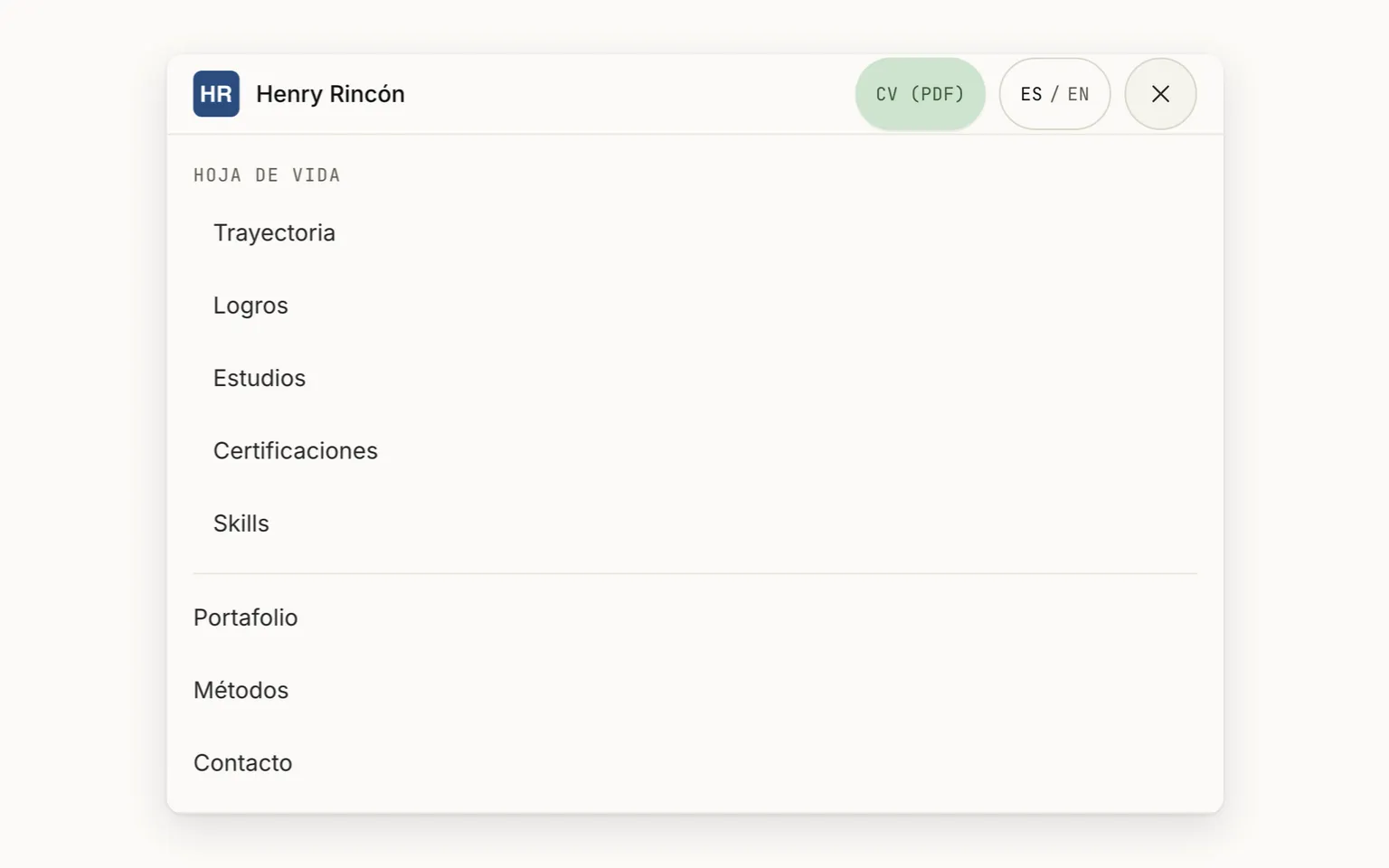
CV-23A menu with four destinations
The header carries the HR mark, four destinations (Résumé, Portfolio, Methods and Contact), the PDF résumé and the language. On a phone, the same menu opens with a button and closes with Escape.
The phone menu: the HR mark and the four destinations
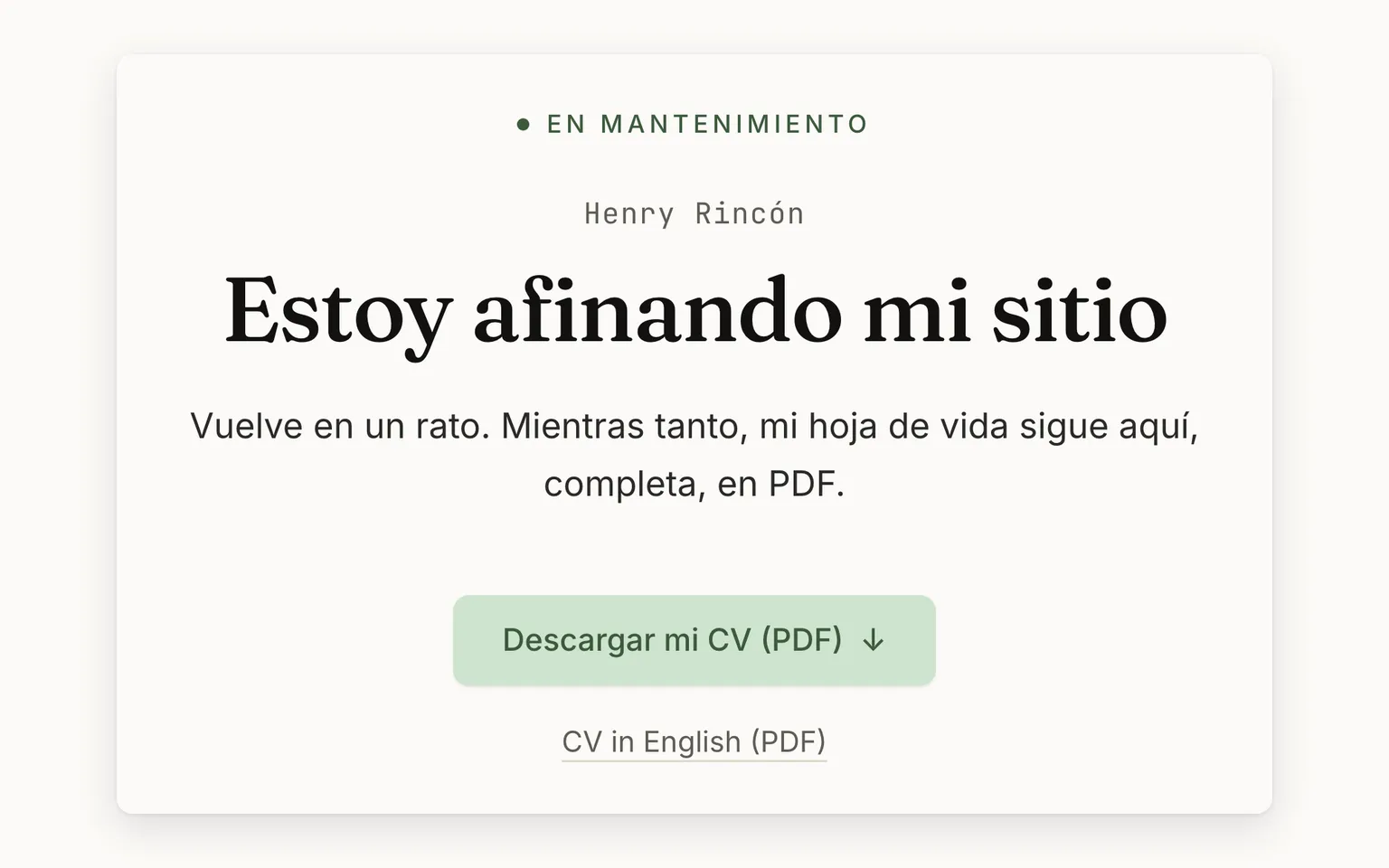
CV-24Maintenance mode, with the CV at hand
One variable puts the whole site into “I'm fine-tuning my site”, in the visitor's language and with the PDF résumé in both languages. It returns 503 with “come back later”, so search engines don't replace the site.
Under maintenance: the notice and the PDF résumé in both languages
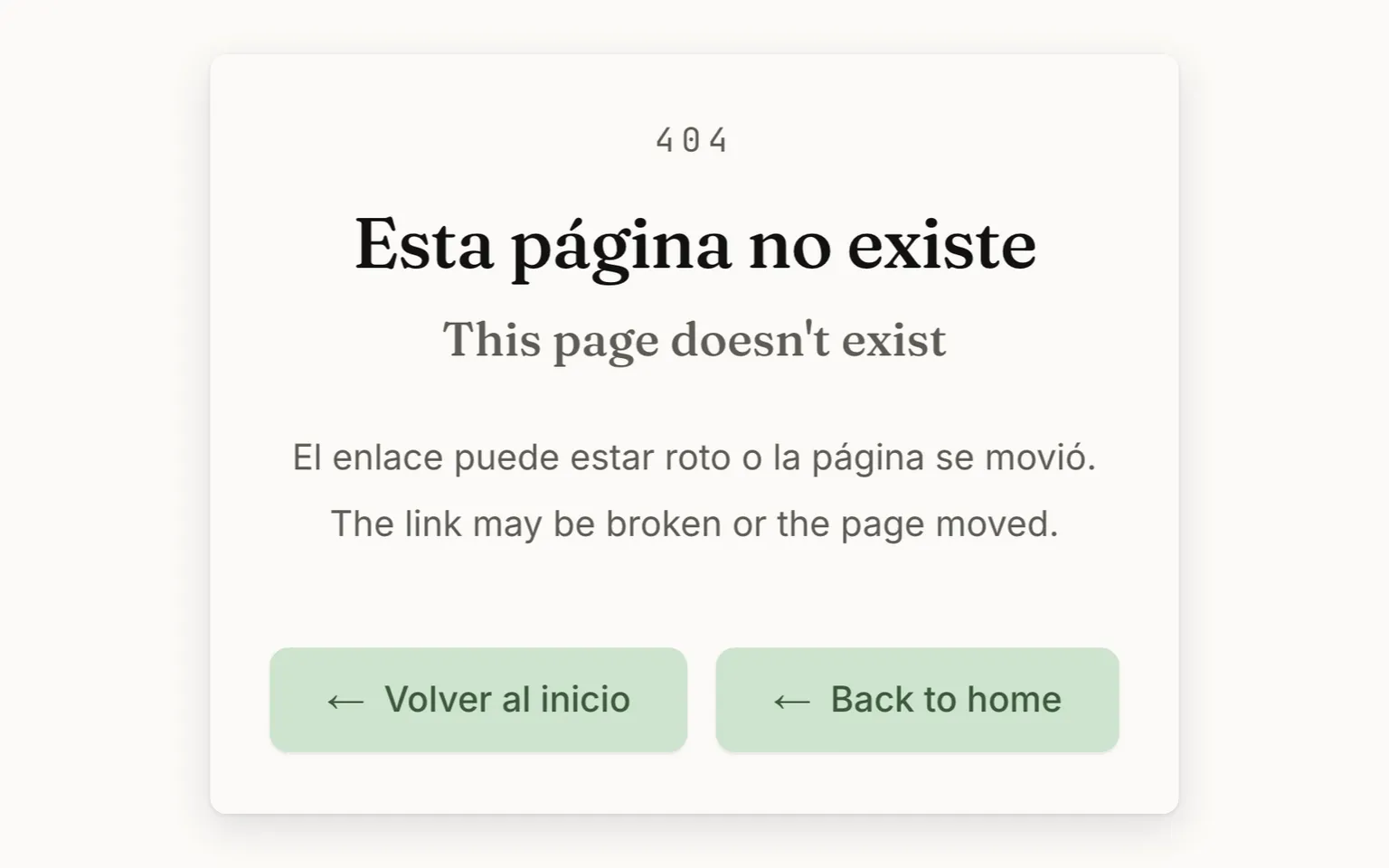
CV-25A 404 that speaks both languages
A file that doesn't exist returns a 404, not a server error, with a page in Spanish and in English and a button to each home page.
The 404 in Spanish and English, with a button to each home page
No screen of its own
CV-26Spanish and English, same place
The whole site exists in Spanish and in English. Switching language keeps you at the same reading point, even though the English is shorter, and the root always opens in Spanish.
It runs through the whole app.
No screen of its own
CV-27Motion you can turn off
Sections reveal themselves as you scroll, with counters and the timeline in motion. With “reduce motion” turned on in the system, all the content appears still.
It runs through the whole app.
No screen of its own
CV-28Content as data, with a gate
All the content lives in data files in Spanish and in English: editing and publishing updates the website, the PDF and the chat at once. A malformed field stops the publish and the live page doesn't break.
It runs through the whole app.
Cards 4
Concept
What is the content gate?
Flip ↻
Answer
All the content lives in data files, in Spanish and English, validated on every publish. A malformed field stops the publish and names the file; the live page doesn't break. Editing and publishing updates the website, the PDF and the chat at once.
Difference
Maintenance or 404?
Flip ↻
Answer
One is a deliberate pause; the other, a page that isn't there. Neither leaves the visitor without a way out.
Maintenance
The whole site says “I'm fine-tuning my site”, with the PDF résumé in both languages, and returns 503 so search engines come back later.
404
An address that doesn't exist returns 404, not a server error, with a button to each home page.
Decision
You switch to English halfway through the career: where do you land?
Flip ↻
Answer
At the same reading point: the role you were reading stays at the same height, even though the English text is shorter.
Decision
You turn on “reduce motion” in your system: what changes?
Flip ↻
Answer
Sections stop revealing themselves as you scroll, and the counters and the timeline stay still: all the content appears at once.
03
03 · End to end
03 · From the published résumé to the conversation
The whole path. No swimlanes: every box says who does it, and the ones with the screen icon show it.
StartStepDecisionAt onceEndOwnerCV VivaVisitorHas a screen
Start · Owner: Has something new to tellHas something new to tell
Step · Owner: Edits the content in Spanish and EnglishOwnerEdits the content in Spanish and English
Step · CV Viva: Validates the content, the figures and the citationsCV VivaValidates the content, the figures and the citations1
Decision · CV Viva: Does it pass the gate?CV VivaDoes it pass the gate?
Step · CV Viva: Stops the publish and names the fieldCV VivaStops the publish and names the field
Step · CV Viva: Publishes the site and the PDF from one sourceCV VivaPublishes the site and the PDF from one source2
Step · Visitor: Walks through the career and the achievementsVisitorWalks through the career and the achievements
Decision · Visitor: Wants to see the evidence?VisitorWants to see the evidence?
Step · Visitor: Opens the case study with its figuresVisitorOpens the case study with its figures3
Step · Visitor: Explores the Portfolio and each app's brochureVisitorExplores the Portfolio and each app's brochure4
Step · Visitor: Reads how design is done in MethodsVisitorReads how design is done in Methods
Step · Visitor: Downloads the PDF résumé for their systemVisitorDownloads the PDF résumé for their system
Decision · Visitor: Wants to talk to the owner?VisitorWants to talk to the owner?
Step · Visitor: Writes or joins the waiting listVisitorWrites or joins the waiting list5
Step · CV Viva: Delivers the message to the owner's inboxCV VivaDelivers the message to the owner's inbox
Step · Owner: Replies to whoever wroteOwnerReplies to whoever wrote
End: The conversation beginsThe conversation begins
End
yesnoyesno: the PDF is enoughyesno
Process notes
1Validates the content, the figures and the citations. A malformed field, a figure its document doesn't state or a citation that leads nowhere stops the publish.
2Publishes the site and the PDF from one source. The website, the PDF and the chat's index come from the same data: they never fall out of sync.
3Opens the case study with its figures. Every figure in a case's band has to be in its background document, or the build fails naming it.
4Explores the Portfolio and each app's brochure. Each app with its process drawn and its figures sourced, and no access link: it is shown, not handed over.
5Writes or joins the waiting list. No form is stored in a database: the message travels by email. The waiting list is only for the apps.
04
04 · Built with method
Every figure says where it comes from. And what the app does not do is spelled out too.
The figures, with their source
28Product features●measuredWhere does it come from?
One per function in the user manual that a visitor or the owner sees or uses, matched section by section. The chat's don't count here: they go in its own brochure.
9Case studies●measuredWhere does it come from?
One for each role in the career, in Spanish and English, counted in the CV's data.
9Methods publications●measuredWhere does it come from?
The “Methods” files. The site's list counts them from the same folder, so no one types that number.
3,618Unit and integration tests●measuredWhere does it come from?
The ones that passed in continuous integration on the last change this version includes. Among other things, they check that the data is well formed, that the case figures are in their document and that Spanish and English say the same; some of them run against a real database.
1,316End-to-end tests●measuredWhere does it come from?
End-to-end journeys in a real browser: on desktop, on a phone and in Safari. They are counted by listing them; in the last full run 1257 passed and 59 are skipped on purpose.
14Site screens●measuredWhere does it come from?
The site's page templates, counted in its files at the pinned version: a single one serves, for example, all nine case studies. They include the maintenance page, the 404 and each app's entry, which is its brochure: a single one for all twelve.
30Recorded decisions●measuredWhere does it come from?
The architecture and product decisions written down and numbered in the repository, 1 to 30 in this version.
2Languages●measuredWhere does it come from?
Spanish and English, each at its own addresses, with the content in two mirror files. A test requires them to say the same.
US$0Monthly operating cost◆declaredWhere does it come from?
Declared by the owner: hosting runs on a free plan and email on its service's free plan, at 100 a day. The custom domain is not included.
What it is built with
Next.js 16 y TypeScriptthe whole site, with all the content in static HTML for recruiters, ATS and search engines
Zod sobre YAMLcontent as data, validated on every publish: a malformed field stops the build and names the file
next-intlSpanish and English on the same routes, /es and /en, keeping the same reading point when you switch
PDFKitthe CV as a selectable-text PDF for ATS, generated on every publish from the same YAML files
Supabasethe real count of roadmap votes, with no personal data
Resendthe messages from “Write to me”, the waiting list and the proposals, which reach the owner's inbox
Vercel y Sentryhosting on the Hobby plan and error monitoring in production
Vitest, Playwright y Lighthousethe tests for every change: unit, browser journeys at two sizes and the performance budget in CI
Your data
✓A roadmap vote stores the app, the feature and the date: neither the IP nor the identity of whoever votes (Law 1581).
✓The “you already voted” notice lives in the visitor's browser. “Write to me”, the waiting list and the proposals aren't stored in any database: they travel by email to the owner.
✓The email shown on the page is not the one that receives the messages.
✓What the chat does with data is in its own brochure.
What it never does
✕Publishes an access link to an app or to its code: the Portfolio shows, it doesn't hand over.
✕Writes a total by hand: the counts of apps, products and publications are measured from the content.
✕Publishes a case figure that its background document doesn't state.
✕Stores personal data for a vote: only the app, the feature and the date.
✕Names a credential in the CV that isn't on the certifications list.
Its limits, stated
!Light theme only: dark mode doesn't exist yet and is a recorded design debt.
!Voting counts one vote per browser: someone who clears their data or switches devices can vote again.
!The forms store nothing: if the email service isn't configured, the message doesn't arrive even though the confirmation shows.
!The Portfolio shows each product's pinned version, with its date, not its real-time state.